APIs and integrations that connect your systems
In many companies, an invisible workforce does the same job day after day: people moving data from one system to the next, exporting lists, pasting them into spreadsheets and importing them again. This work is slow, error-prone and expensive, and it can almost always be automated. The tools for that are APIs and integrations: the connections through which your systems talk to each other directly. This article shows why good integrations pay off, what they look like, and when to build your own versus use a ready solution.
Key takeaways
- Integrations remove manual work and make it more reliable, because systems talk to each other directly.
- A clean API is understandable, predictable and well documented, not as clever as possible.
- Several approaches exist: direct interfaces, webhooks and middleware, depending on the need.
- Reliability and security decide success, not the raw feature itself.
Why integrations matter at all
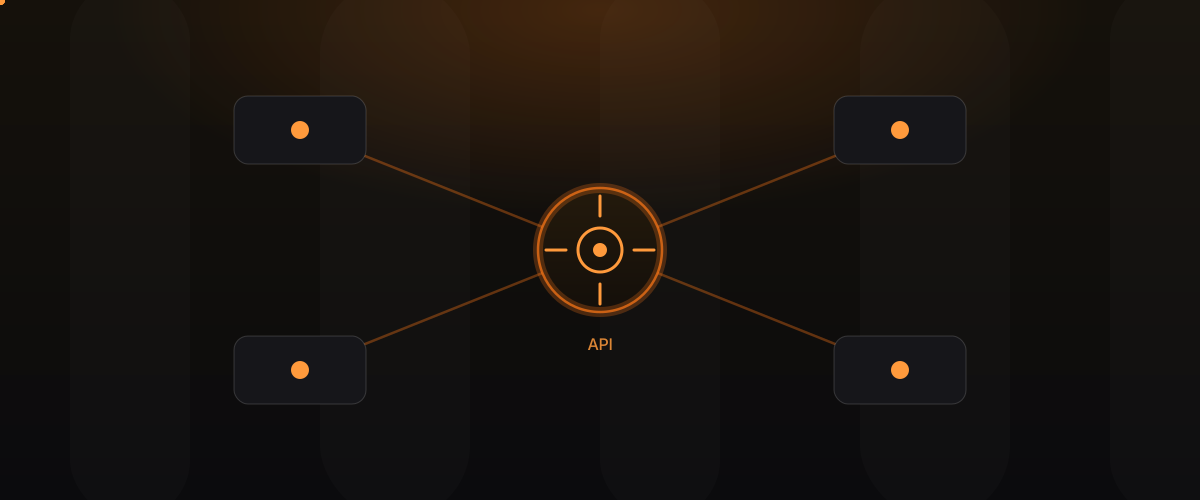
An API, an application programming interface, is at heart an agreed language in which two systems exchange information. An integration is the concrete connection built on that language. The gain is tangible: less manual work, fewer errors and a single source of truth, instead of the same data in five different places. When sales changes something and it immediately shows up correctly in accounting, shipping and reporting, with nobody retyping anything, the company works faster and makes fewer mistakes.
What a clean API looks like
A good interface isn’t the cleverest, it’s the most understandable. It stands out through a few traits:
- Predictability: the same requests return the same answers, and behaviour is consistent.
- Clear naming: fields and terms are called what you’d expect, and mean the same everywhere.
- Good documentation: anyone using the interface understands how it works in a short time.
- Honest error messages: when something goes wrong, the API says clearly what and why, instead of going silent.
- Stable versions: changes don’t break existing connections overnight.
An API like this isn’t just pleasant to use; it also lowers the cost of every future integration.
The common approaches at a glance
There isn’t one right way, but several proven approaches that suit different situations. The overview below helps with a first orientation:
| Approach | How it works | Fits well when |
|---|---|---|
| Direct interface | One system actively asks another | Data is needed on demand |
| Webhooks | A system reports events itself | Real-time reactions matter |
| Middleware | A layer in between connects several systems | Many systems must work together |
In practice you often combine these approaches. What matters isn’t the technology itself, but that it fits the actual need.
One source of truth instead of many copies
Perhaps the biggest gain of a good integration isn’t the time saved but the clarity gained. As long as the same information is maintained manually in several places, those places inevitably end up in conflict: the CRM holds a different address than accounting, the stock level in the shop differs from the real one. Nobody knows which number is right anymore. A clean integration defines which system is the authoritative origin of a piece of information, and makes sure everyone else adopts that state. The result is a single source of truth that sales, shipping and reporting can all rely on equally. This clarity is often worth more than any individual automated task.
Reliability is not an extra
An integration that works most of the time is more dangerous than none at all, because you come to rely on it. The difference between a prototype and a production solution lies almost entirely in how it handles errors. What happens when a system is briefly unreachable? Is the request retried automatically later? Does anyone notice when data fails to arrive? A reliable integration plans for the bad day, not just the good one, and surfaces problems before they become silent data gaps.
Error handling in practice
Good error handling follows a few simple principles:
- Retry instead of giving up: temporary failures are attempted again automatically.
- No double processing: a request must not take effect twice, even when retried.
- Make it visible: errors are logged and reported, not silently swallowed.
- Fail cleanly: when it can’t continue, the system stays in a clear, traceable state.
This care is unspectacular, but it decides whether an integration earns trust for years or becomes a constant source of errors.
Security from the start
An integration opens a door between systems, and every door needs a lock. Security starts with the question of who is allowed to access at all, and reaches all the way to encrypting the transfer. The principle of least privilege matters: a connection should only be able to access what it truly needs, not everything. How systems identify themselves belongs here too, as does careful handling of credentials. Security is closely tied to the clean data model underneath, as we showed in the post on the cost of a bad data model.
Build your own or use a platform?
Not every integration has to be built yourself. For common connections between well-known systems, ready platforms exist that take a lot of work off your hands. A ready solution pays off when the use case is common and demands no special handling. Building your own pays off when the connection sits at the core of your business, needs particular logic or has to grow flexibly over the years. The honest answer is often a mix: cover the standard cases via platforms, build what is genuinely yours yourself.
Integrations and technical debt
Integrations stitched together quickly are a common source of technical debt. A connection built without error handling, without documentation and without clear ownership works at first and later becomes a burden nobody wants to touch. Those who treat integrations from the start with the same care as the rest of the software save themselves exactly that interest. More on that in the post on technical debt.
How we handle it
We don’t treat integrations as a side matter but as what they are: the nervous system between your systems. We first clarify which data truly needs to flow where, and who is the source of truth, before we write code. We plan for failure cases, document the interfaces understandably and make operation visible, so problems surface before they turn into data gaps. The result is a connection you can rely on for years. More on that under Software Engineering.
Frequently asked questions
What’s the difference between an API and an integration? An API is the agreed language in which a system offers information. An integration is the concrete connection that uses this language to make two or more systems work together.
Do I need real-time, or is a regular sync enough? It depends on the use case. Some processes need an immediate reaction, such as an order in shipping. For many analyses, a sync at fixed intervals is entirely enough and simpler.
What happens if a connected system fails? With a well-built integration, nothing dramatic: requests are retried automatically later, and the problem is reported visibly. With a poorly built one, data is lost unnoticed.
Is a ready platform always cheaper than building your own? Not necessarily. For standard cases, usually yes. But if the integration sits at the core of your business or demands special handling, building your own can be cheaper and more flexible long term.
How important is security for internal integrations? Very important, even internally. A connection should only ever access what it needs. That guards against mistakes and limits the damage if something does go wrong.
Who should help decide on a new integration? Tech and the business side together. The business side knows which data truly needs to flow, tech knows how to make that reliable and secure. The best decisions come from the conversation.
Conclusion
Good integrations are rarely visible but felt everywhere: less manual work, fewer errors and a data foundation you can rely on. Those who build APIs and integrations with care for reliability and security connect their systems into a whole that works faster and more calmly than the sum of its parts.
Learn more under Software Engineering and Web and app engineering. Related post: Keeping software running.