Setting up GA4 with server-side GTM the right way
Most GA4 installations are clicked together in an hour: one web container, a few tags, done. These are exactly the setups that later lose data systematically and produce numbers no one really trusts. Server-side tracking changes that, but only when GA4 and the server-side Google Tag Manager work cleanly together. This article shows how to recognise a solid setup and how we build one in practice, without the marketing fluff.
Key takeaways
- A clean setup uses two GTM containers: a lean web container and a server container that keeps control over the data.
- Collection runs through your own first-party subdomain, which makes it harder to block and keeps cookie lifetimes stable.
- Consent Mode v2 and the measurement plan belong at the start, not the end.
- Without validation and monitoring, any tracking setup is flying blind.
Why GA4 alone isn’t enough
GA4 is a good analysis tool, but it’s only as reliable as the data that reaches it. By default a client-side tag collects events directly in the browser and sends them to Google. So every weakness of browser-based tracking also applies to GA4: ad blockers, short cookie lifetimes from Apple’s ITP and uncounted users tear gaps into the very reports you allocate budget on.
The server-side GTM steps in one stage earlier. It gives you back control before the data reaches GA4 or an ad platform. Our guide on server-side tracking explains the fundamentals; here we focus on the concrete setup with GA4.
The two containers: web and server
A reliable setup separates two jobs cleanly:
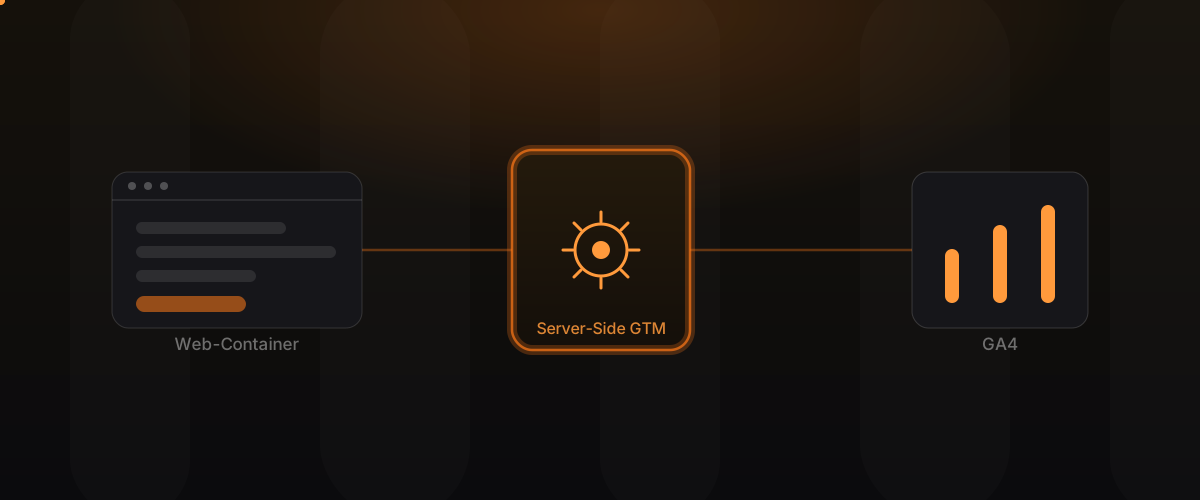
- The web container in the browser stays deliberately lean. It captures the event and sends it not directly to Google, but to your own endpoint.
- The server container runs on your infrastructure. It receives the events, cleans and validates them, respects the consent status and decides, rule-based, which data goes to GA4 and other destinations.
That turns “the browser reports everything unfiltered to the outside” into “your infrastructure controls the data flow”. That is the real lever.
Step by step to a clean setup
- Measurement plan first: Which events, which parameters, which decisions depend on them? Clear, meaningful naming saves a lot of cleanup later.
- Server container on an EU server: set up the server-side environment, hosted in Germany,
connected to your own first-party subdomain like
data.your-domain.com. - Connect the web container: the lean web container sends events to the server endpoint instead of directly to Google.
- Configure GA4 via the server: the server container forwards the cleaned events to GA4, in a controlled and traceable way.
- Integrate consent: wire Consent Mode v2 and your banner together cleanly, so only what may be collected is collected and passed on.
- Validate and monitor: reconcile the numbers across browsers and devices, then keep monitoring the data flows.
A first-party domain instead of a Google subdomain
Many setups still send to a Google domain and give away half the benefit. When collection runs through a subdomain on your server, it’s much harder to block and unaffected by the short cookie lifetimes of client-side scripts. Returning users are recognised as such more reliably, instead of being miscounted as new.
Consent Mode v2 from the start
Consent isn’t an obstacle you bolt on at the end, it’s part of the foundation. With Consent Mode v2 the setup respects each user’s consent status before any data is passed on. Done cleanly, that means: what may not be collected isn’t collected, and you still keep a solid data basis. Add consent only as an afterthought and the setup is neither clean nor reliable.
A measurement plan instead of clicked-together tags
The most common reason for unusable data isn’t a technical bug, it’s missing structure. Events without a thought-through data model can barely be analysed later. So we define up front which events are captured with which parameters, and name them consistently. That’s the same discipline that sits behind a good data model in software: those who create order early save themselves expensive repairs later.
Standard GA4 vs. GA4 with server-side GTM
| Criterion | Standard GA4 (client-side) | GA4 via server-side GTM |
|---|---|---|
| Data completeness | gaps from ad blockers and ITP | considerably more complete |
| Cookie lifetime | often just a few days | first-party, stable for longer |
| Control before forwarding | low | full control in the server container |
| Consent handling | client-side, error-prone | central and traceable |
| Page load time | many third-party scripts | lean web container |
Which events actually matter
More events don’t mean better data. We deliberately capture the events real decisions depend on: completed purchases, qualified leads, steps in the checkout or enquiry flow. Each event gets clearly defined parameters such as value, currency or campaign, so it can be analysed cleanly later. That creates a manageable, solid data basis instead of a flood of clicks nobody interprets. In the server container these events can also be enriched, for example with internal metrics that aren’t even available in the browser.
What a server-side setup means in operation
A server-side GTM is infrastructure, not a one-off project. It runs on its own environment that needs hosting, updates and monitoring. In practice that means manageable, predictable hosting costs and a little ongoing care, in exchange for more complete data and full control. Measured against the ad budgets allocated on the basis of that data, the effort usually pays for itself quickly. The key is to plan for operation from the start, instead of leaving the setup to itself after go-live.
Common mistakes
- Only switching the web container: without a server container it stays client-side tracking with extra effort.
- Still sending to Google domains: gives away stability and completeness.
- Consent as an afterthought: leaves the setup exposed and the data messy.
- No monitoring: tracking isn’t “set up once and forget”, or it breaks unnoticed.
How to recognise a good setup
A solid GA4 setup with server-side GTM shows in a few signs: the numbers in GA4 and your ad account no longer diverge significantly, returning users are recognised realistically, and the data doesn’t drop uncontrollably after a consent banner goes live. Keeping it that way relies on ongoing monitoring, the same approach we take to running software reliably.
Frequently asked questions
Do I strictly need the server-side GTM for GA4? No, but without it the familiar gaps of client-side tracking remain. The server-side GTM is the most common way to make GA4 more complete and reliable.
Will I lose my existing GA4 data? No. Your existing GA4 property stays, the data simply arrives through a controlled route from now on.
Is this compatible with the GDPR? Server-side GTM doesn’t replace consent, but it gives you the technical control to respect consent cleanly and host in the EU. The legal assessment in each case belongs with your data protection advisor; we provide the clean technical basis.
How long does the setup take? A focused setup is often in place within a few weeks, including the measurement plan, implementation and validation.
Is it worth it for smaller websites? It’s worth it as soon as you spend meaningful ad budget or optimise for conversions. The more data-driven your decisions, the more expensive patchy data becomes.
Can you take over an existing GA4 setup? Yes. We review your current setup, keep the event plan that makes sense and move collection to the server-side route step by step, without your reporting breaking.
Conclusion
GA4 is only as good as the data that reaches it. With a cleanly set up server-side GTM, your own first-party domain, a thought-through measurement plan and Consent Mode v2, a leaking standard setup becomes a reliable basis for decisions. We treat measurement as engineering and even build our own tool for server-side tracking and GTM hosting, PIXCON.
Learn more on our Measurement Infrastructure page. Related reading: Server-Side Tracking: the complete guide and The hidden cost of a bad data model.